
Back to products
![[Apple MFi Certified] Retractable Car Charger USB C, Braveridge 120W USB C Car Charger 4 in 1 PD/QC Type C Fast Charge Cigarette Lighter Adapter for iPhone 17/17 Pro Max/16 Pro/15/Galaxy S26/S25/Pixel](https://www.drivecomfort.blog/wp-content/themes/woodmart/images/lazy.svg)
![BRCOVAN Anti-Theft Phone Mount Holder with Vibration Dampener [Camera Friendly] [1s Lock & Release] with Aluminum Round Base & Medium Arm, for Car Boat Truck Motorcycle UTV, Fit 5.4-7.2'' Smartphones](https://www.drivecomfort.blog/wp-content/uploads/2026/04/81y1rk5iHL._AC_SL1500_-150x150.jpg)
![[Apple MFi Certified] Retractable Car Charger USB C, Braveridge 120W USB C Car Charger 4 in 1 PD/QC Type C Fast Charge Cigarette Lighter Adapter for iPhone 17/17 Pro Max/16 Pro/15/Galaxy S26/S25/Pixel](https://www.drivecomfort.blog/wp-content/uploads/2026/04/71hZtc-G-WL._AC_SL1500_-150x150.jpg)
[Apple MFi Certified] Retractable Car Charger USB C, Braveridge 120W USB C Car Charger 4 in 1 PD/QC Type C Fast Charge Cigarette Lighter Adapter for iPhone 17/17 Pro Max/16 Pro/15/Galaxy S26/S25/Pixel
Original price was: $23.89.$17.95Current price is: $17.95.

JHW –
Great GPS
Our old Garmin was so old it was not possible to update the maps so we bought this one. This new one was just great. We used it to travel home to Ontario, Canada from our rental home in Florida. It was reliable, always correct and gave great advice about what lane to be in on busy interstates. It was also good for finding gas stations and restaurants nearby. When we arrived back to Canada it was seamless to continue our trip home. This ca with lifetime North American map updates which we really appreciate.
JohnnyB –
Just like new
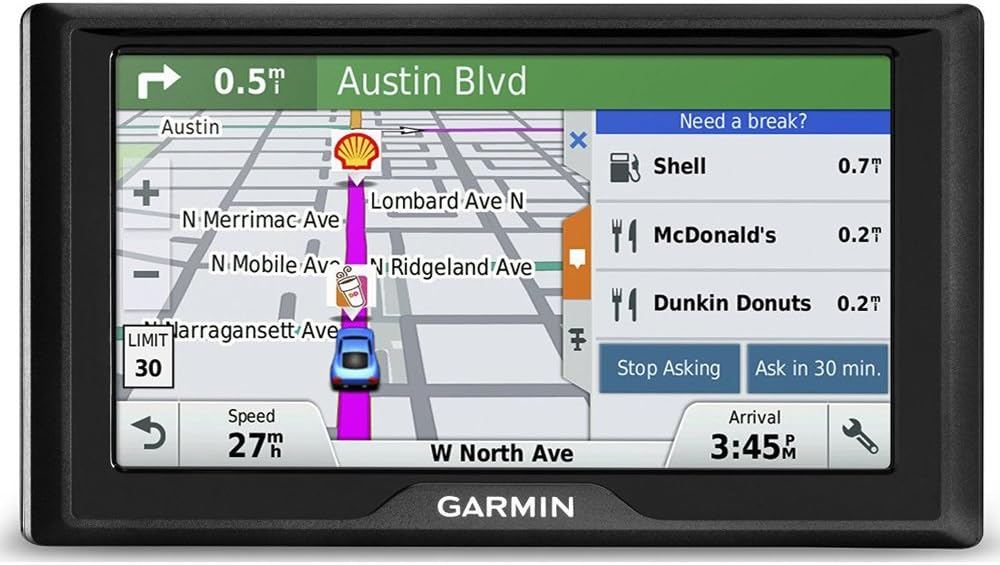
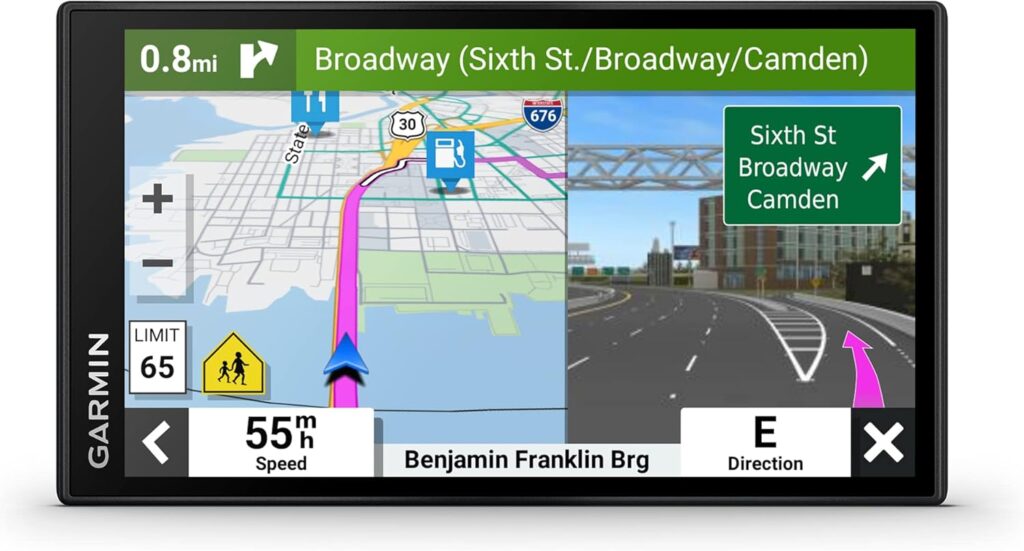
I bought this unit as a refurb to save quite a bit of money. I always try to buy refurbs on this kind of equipment and have never been disappointed. This one is no exception. It looks brand new and performs more or less flawlessly. It replaces a seven year old Nuvi which was working fine, but lacked in some areas where I wanted improvement. This Drive 60 is larger and much easier to see. The driving instructions are much clearer and the detail on the map is very much improved. It has numerous features, such as look ahead, intermediate stops programming, and speed limit and curve warnings, as well as red light camera ahead. Even with the map set to “maximum detail” it doesn’t have the lag of keeping up with where I am like the Nuvi did. It’s very clear on when and where to turn or exit. It takes a few minutes to setup and download current maps and software, but once done it’s ready to go. It came with the standard Garmin ball mount adapter, a windshield suction mount, 12 volt car cable, and USB charging and computer interface cable. I’m using the bean bag dash mount from my old Nuvi. The time to arrive window can be set to action projected time or countdown. I like the countdown so I can instantly see how long it is to a programmed intermediate stop. This is a great unit and I highly recommend the refurb.
David P. –
typical garmin, works very well, just slightly off in accuracy, but minor
i did the update before a long trip.. update literally took several hours………… THAT, i find a bit of ” you gotta be kidding me ?” kind of issue. i have fast internet, but the device/web site stated ” this may take several hours”…so be prepared to have that kind of time for a big update.OK. it DID update..plugged in the address ( 710 mile trip ).. and left.. went on a couple of different roads i normally hadnt travelled ( not a complaint, it was actually an improvement ), and got me where i wanted to go, with little issue.coming back, slight change in my route, as i wasnt heading back to where i had started from ( work, not home).. again, no issue.it showed a few small side streets as not existing, or not connected, streets that have been around for some time, and shouldnt be “missing”, even without any update.BUT, other than that, and again, only a minor error here and there, over all, its a solid 4 out of 5 stars. maybe slightly higher.shows nearby gas, food, lodging as you get close to them, will “ask you” if you want to stop ( you can just decline the reminders ) for gas or food/lodging, shows you school zones, and speed zones.it was “Off” in a few places, as the speed zones had been updated and Garmin didnt have the current ones in its system update, meaning the zone was higher than Garmin was registering.not an issue, unless you are a true ” i only go the speed limit” kinda person………Overall, i like this Unit. size is ” just right” to see all i need to see (6″ screen). touch screen is easy to use,inputting the address is a little issue, as it wants to only look for states immediately adjacent to where you are, for the address you input. i was going 700 miles, so i had to re-input the address a few times, to figure out how to get it to register the correct State i was traveling to.No paperwork came with this, so actual instructions might have helped. but again, not a “Note worthy” issue, I just had to figure out what i was missing, in my address input.once done, takes you where you want to go. it doesnt have live traffic updates, which might be a nice upgrade, as i got lucky on no real issues, other than construction that is just unavoidable on the trip.i would recommend this unit. just make sure you update long before you go, and practice inputting addresses if you are going on a really long trip. otherwise, it is fairly simple to use, for modest distances.
ARosiered1 –
Accurate!!
I was a little leery about this due to some of the reviews but I went ahead and bought it, knowing I had my phone as a backup and would just return it if it wasn’t accurate. This GPS is worth the money and is accurate. I used it to go to Kentucky and will be using it to go to Tennessee next month. Also has a nice, big screen! Well worth the money!!
G. J. Reiser –
It Will Bring You Home Safe, In Due Time
Compared to my old Tom Tom XXL, the learning curve is much more difficult, but after that it works great. Be aware that it is not ready to use out of the package, you need to charge the battery before you can do anything. When you charge the battery off the USB port on a computer, you cannot operate the device at any time. For use in an automobile, the unit comes supplied with a cable equipped with the old cigarette lighter connector. That worked fine with our 2006 Toyota Highlander but, on a recent trip we rented a Mazda CRX5 which did not have a cigarette lighter port in the front console. It did have charger ports for iPhones and lap tops but useless for the Garmin cable. You can order a different cable from Garmin but be aware of the problem if you have a newer vehicle. On the road, the unit does a good job of navigating with very fast “recalcuting” directions. We live in the mountains of Western North Carolina where the roads are very twisty according to mountain terrain. It seems that all brands of navigation devices tend to take the nearest Interstate route, however in the mountains, sometimes you can’t get there from here. The Garmin, just like my old Tom Tom, will finally get you to your destination but you may not like the route. The Garmin Drive 60 has a lot of features that my old Tom Tom did not have so overall I like it a lot better.
raghavendra –
Yes it’s a good product, it gives every road information.thanks Garmin really it’s good navigation systemThe screen is large /big one 6inch
Juan Manuel –
Muy buen GPS
GT Dude –
I always bought Garmin for my Car GPS and love the reliability and features of the product. This is my third Garmin GPS and although I love this one the most as it has the largest screen yet, I don’t like the touch screen.I have to press really hard to make it respond, on my older units this was not the case.The suction cup is great it stick really good to my windscreen and does not fall off when it gets very hot in the car.All in all a great GPS at a great price, the cheapest I have paid of the three units I have owned over the years.
Ken Esch –
I have owned several Garmin units with this one being the most advanced. I really like this model But there a couple of annoying issues. The main issue is a lack of contrast adjustment for the screen. During daylight the screen is very “washed” out making it very hard to read. Night time clarity is great. My opinion is that this contrast is so bad, that it is probably a defect in just my unit. I probably should have returned it. I cannot fathom that Garmin would produce a unit that operated like this one. There are a couple of software glitches too. Periodically one of the warnings such as “curve ahead” will appear, but then stay on. It usually requires a complete re-boot to eliminate. Secondly when the first spoken notice of a turn approaching the unit always says “left turn in 1.5km”. This occurs even when it is a right turn. I’ve learned to check the screen to verify the turn direction, It does however indicate a right turn on subsequent notices. Very strange. Since the unit has lifetime upgrades hopefully these glitches will disappear.
Don Rhone –
Based on the picture of the item which shows the split screen I bought this item. What I received is not what shows on The picture is correct. . I wanted a split screen model as shown on the picture of this unit, but that feature is only activated while you are in a larger City. So Amazon did not use the wrong picture, (not true, my mistake)- Well after familiarizing myself with this unit it turns out I was wrong,, I used the Garmin chat line and the only time you see the split screen is when you are in larger cities, so that is why I could not activate it as I live in a small berg. IT is actually a very nice unit for the price, note it has been discontinued though, So the newer units most likely have more features.